
For more than 20 years, iTunes has been the main tool for connecting iPhones and iPads to computers. Apple later split iTunes into several apps on macOS, but the Windows version is still widely used. Even so, many power users, developers, repair technicians, and IT administrators are now choosing 3uTools instead of Apple’s software.
This change is not only about looks or convenience. The main reason is control. Apple designed iTunes to keep users inside a highly controlled environment. In contrast, 3uTools gives users more access to device information, system tools, and management features. For people who want deeper control over their iOS devices, that difference matters.
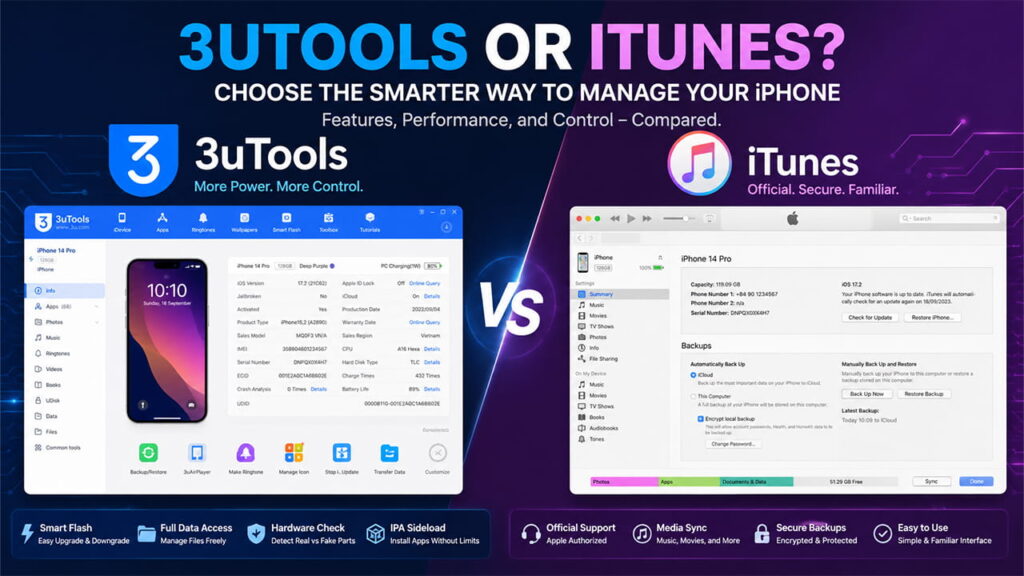
1. Feature Architecture: A Direct Comparison
To understand why many users are moving away from iTunes, it helps to look at how both programs handle an iPhone or iPad.
iTunes mainly treats an iOS device as a secure media device. It focuses on syncing content, creating backups, and managing Apple services.
3uTools takes a different approach. It treats the device as computer hardware that users may want to inspect, repair, manage, or customize.
Main Features
Apple iTunes (Windows)
- Media syncing
- Full-device backups
- DRM and content management
- Standard firmware restoration
- Basic device information
3uTools (v3.0 and later)
- Hardware inspection
- Device flashing tools
- File management
- Selective backups
- Detailed diagnostics
- App installation and management
- Component verification
Backup Options
iTunes only creates a complete backup of the entire device.
3uTools allows users to back up selected data such as contacts, messages, photos, applications, or call logs.
Firmware Control
iTunes normally installs only the latest signed iOS version available through Apple.
3uTools includes Smart Flash tools that offer more firmware options, including upgrades, reinstalls, and certain flashing methods that can keep user data.
File Access
iTunes provides very limited access to the device file system.
3uTools allows access to media directories and provides deeper access on jailbroken devices.
Hardware Information
iTunes only shows basic information such as serial number and storage capacity.
3uTools displays battery cycle count, battery health details, component information, and other hardware data.
App Management
Apple requires apps to go through its official systems and verification methods.
3uTools supports IPA installation and advanced application management features.
2. Why More Users Are Making the Switch
Several key features are driving this move from iTunes to 3uTools.
Better Control Over Backups
One of the biggest limitations of iTunes is its backup system.
When creating a backup with iTunes, users must back up the entire device. The software creates a large backup file that contains almost everything on the phone.
Problems appear when users need only specific data.
For example, someone may want to save only text messages, contacts, or photos. Another person may want to restore only app data. iTunes does not offer these options.
3uTools solves this issue through its Customized Backup feature.
Users can choose exactly what they want to save. Messages, contacts, photos, call history, and other data can be backed up separately.
In addition, the backup viewer allows users to open backup files directly on a computer. They can browse the stored information without restoring the backup to an iPhone first.
That extra flexibility saves time and makes data management much easier.
Smart Flash and More Firmware Freedom
Restoring or updating iOS through iTunes can sometimes be frustrating.
Many users have experienced update failures that end with error codes such as Error 4013 or Error 14. When this happens, the device may enter Recovery Mode and require a complete restore.
In many situations, users must erase their data and install only the newest iOS version available.
3uTools offers a different experience through its Smart Flash section.
The software automatically downloads signed IPSW firmware files directly from Apple servers and presents them in a simple dashboard.
Users can then choose from several flashing methods.
Quick Flash Mode
This option performs a clean installation.
All data is erased, and the operating system is installed from scratch.
Retain User’s Data Flashing Mode
This option reinstalls or updates iOS while keeping user data.
It is especially useful when a device is stuck in a boot loop or experiencing software problems.
Many users consider this feature one of the biggest advantages of 3uTools.
Anti-Recovery Flashing
This mode overwrites storage data more deeply.
It helps prevent deleted information from being recovered with forensic recovery tools.
As a result, it can be useful before selling or transferring a device.
Hardware Verification and Fraud Detection
The used iPhone market continues to grow. However, buyers often struggle to verify whether a device contains original parts.
iTunes provides almost no help in this area.
The software can display a serial number, but it cannot verify internal components.
3uTools includes a feature called View Verification Report.
This tool checks information stored in individual hardware components such as:
- Battery
- Display
- Front camera
- Rear camera
- Motherboard
- Touch ID or Face ID hardware
The software compares these records with factory information.
If parts have been replaced, repaired, or modified, 3uTools highlights them clearly.
For example, a replacement battery or non-original screen may appear as a warning.
This feature gives buyers, sellers, and repair technicians a much clearer picture of a device’s condition.
It also helps reduce the risk of fraud when purchasing used devices.
3. The Advantage of Sideloading and Customization
Apple carefully controls how applications are installed on iOS devices.
Normally, users must install apps through the App Store. Developers often use tools such as Xcode or TestFlight when testing applications.
These methods work, but they can add extra steps and restrictions.
3uTools offers another option through its IPA Signature tool.
Users can open Toolbox and select IPA Signature.
The software allows local signing of IPA files using an Apple ID or developer certificate.
After signing, applications can be installed directly through the Apps section.
For developers and advanced users, this process is often faster and easier than Apple’s standard workflow.
As a result, testing and managing applications becomes much more convenient.
4. Solving Common 3uTools Problems
Although 3uTools is powerful, it still depends on Apple’s drivers to communicate with iOS devices.
Because of this relationship, some problems can occasionally appear.
Problem 1: Device Not Recognized or Connection Timeout
This issue usually happens because of driver conflicts or poor-quality USB cables.
In some cases, older Apple drivers interfere with the connection.
In other cases, the cable may provide charging but fail to transfer data properly.
Solution
Open 3uTools and select Repair Driver.
Next, choose Advanced Repair.
This process removes old Apple driver entries and installs fresh connection drivers.
A certified Lightning or USB-C cable is also recommended.
In addition, connecting directly to the computer motherboard usually provides a more stable connection than using a USB hub.
Problem 2: Error 60 or Error -1 During Smart Flash
These errors usually appear when communication stops during a critical flashing stage.
The interruption often happens before firmware data is written to storage.
Solution
Temporarily disable Windows Defender real-time protection or third-party antivirus software.
Some security programs incorrectly flag firmware extraction processes.
Also, many technicians recommend using a rear USB 2.0 port on desktop systems.
USB 2.0 connections can sometimes provide better stability during DFU operations than certain USB 3.0 controllers.
5. Security and Compatibility Considerations
Before replacing iTunes completely, users should consider a few important limitations.
Windows-Only Software
3uTools is designed only for Windows.
Mac users cannot install it natively.
To use 3uTools on a Mac, users typically need a Windows virtual machine or a separate Windows computer.
Otherwise, they must rely on Finder and Apple’s other macOS tools for device management.
Privacy and Corporate Policies
3uTools is a third-party application.
Because it operates outside Apple’s controlled software environment, some organizations limit or completely block its use.
Businesses that handle sensitive information often follow strict security and compliance rules.
In these situations, Apple software remains the preferred option because it fits more easily into established corporate policies.
Downloading 3uTools and iTunes
Getting started with either tool is simple.
3uTools Download
Users can download 3uTools from its official website and install it on a Windows PC. After installation, the software automatically checks for the required Apple drivers. Once an iPhone or iPad is connected, users can access features such as Smart Flash, device verification, backups, and app management.
iTunes Download
iTunes for Windows can be downloaded from Apple’s official website or through the Microsoft Store. After installation, users can connect their iPhone or iPad to sync data, create backups, restore devices, and manage media content through Apple’s official software environment.
Conclusion
Both iTunes and 3uTools can manage iPhones and iPads, but they serve different types of users.
iTunes focuses on security, official support, media management, and standard device backups. It works well for users who only need basic functions.
3uTools focuses on control, diagnostics, customization, flashing tools, hardware verification, and flexible data management. These features make it attractive to developers, technicians, advanced users, and people who frequently work with multiple iOS devices.
The growing shift toward 3uTools shows that many users want more visibility and control over their hardware. While Apple’s software remains the official solution, 3uTools offers a level of flexibility that iTunes simply was not designed to provide.